
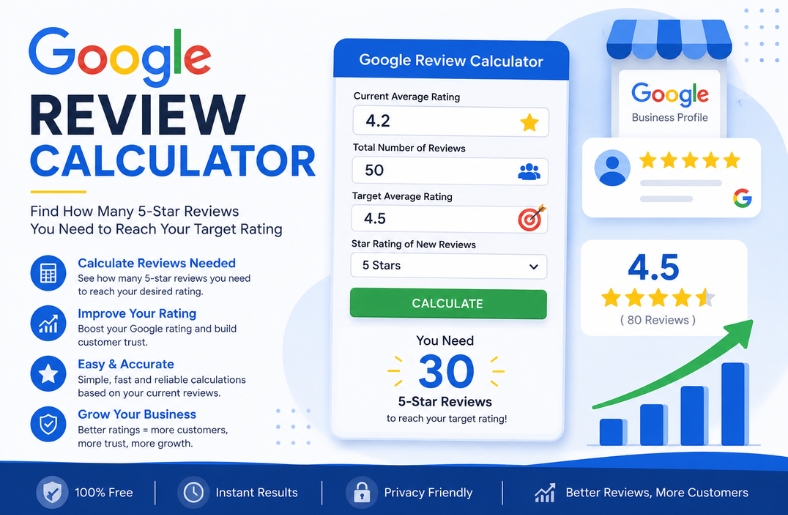
If your business has a Google Business Profile, your star rating can have a major impact on how potential customers perceive your business. A common question among business owners is: How many 5-star Google reviews do I need to improve my rating?
A Google review calculator helps answer that question by using your current star rating, total number of reviews, and desired target rating to estimate how many additional 5-star reviews may be required.
For example, a business with a 4.2-star average and 50 existing reviews will need more new 5-star reviews to reach 4.5 than a business with only 10 reviews at the same rating. The reason is simple: every new review becomes part of the overall average.
This guide explains how a Google review calculator works, how to calculate the number of reviews you need, why review volume matters, and what to do when you have a legitimate reason to remove negative reviews from your Google Business Profile.
It is important to remember that Google reviews should represent genuine customer experiences. Google prohibits fake or incentivized reviews, including offering rewards in exchange for posting, changing, or removing reviews.
What Is a Google Review Calculator?
A Google review calculator is a tool that estimates how many additional reviews a business needs to reach a specific target rating.
Most calculators require three basic inputs:
- Current Google rating
- Current number of reviews
- Target rating
Some advanced calculators also allow you to enter an expected average for your future reviews instead of assuming every new review will be 5 stars.
For example, you might enter:
- Current rating: 4.1
- Current reviews: 40
- Target rating: 4.5
- New review average: 5 stars
The calculator then estimates how many additional 5-star reviews are needed to reach the target.
This is useful for reputation management because it turns a general goal such as “I want more reviews” into a measurable target.
How Does the Google Review Calculator Work?
The calculation is based on an average-rating model.
The basic concept is:
Current rating × current number of reviews = estimated existing rating points
Then, new 5-star reviews are added to the total.
The mathematical formula for the number of additional 5-star reviews is:
x = n × (T − R) ÷ (5 − T)
Where:
- x = number of new 5-star reviews needed
- n = current number of reviews
- R = current average rating
- T = desired target rating
- 5 = maximum possible star rating
The result should be rounded up to the next whole review because you cannot receive a fraction of a review.
Example
Suppose your business currently has:
- 50 reviews
- 4.2 average rating
- 4.5 target rating
The calculation is:
x = 50 × (4.5 − 4.2) ÷ (5 − 4.5)
x = 50 × 0.3 ÷ 0.5
x = 30
So, under this simplified calculation, you would need approximately 30 additional 5-star reviews to move a 4.2 average across 50 reviews to 4.5.
However, there is an important limitation: the rating shown on Google is a displayed average and may be rounded. Therefore, a calculator using the displayed rating should be treated as an estimate rather than a guarantee of the exact number of reviews required.
Why Do More Reviews Make It Harder to Raise Your Rating?
The number of existing reviews matters.
Imagine two businesses both have a 4.0-star rating.
Business A
- 10 reviews
- 4.0 rating
Business B
- 200 reviews
- 4.0 rating
Business A can change its average much faster because each new review represents a larger portion of the total review history.
Business B has hundreds of existing ratings influencing the average. Therefore, many more positive reviews may be required to create the same change.
This is why a Google review calculator becomes particularly useful for businesses with a large number of existing reviews.
Instead of guessing how many reviews are needed, you can estimate the required volume based on your current numbers.
How Many 5-Star Reviews Do You Need?
There is no universal number of reviews required to reach a specific rating.
It depends on:
- Your current rating
- Your existing review count
- Your target rating
- The average rating of future reviews
For example, moving from 4.0 to 4.5 is mathematically different from moving from 4.5 to 4.8.
The closer you get to 5.0, the more difficult it becomes to move the average upward.
Why Is 5.0 Difficult to Reach?
If your existing rating is below 5.0, adding 5-star reviews can move the average closer to 5.0.
But mathematically, you cannot reach a perfect 5.0 average through additional 5-star reviews if your existing reviews include anything below 5 stars.
You can get closer and closer, but the existing lower ratings continue to influence the average.
This is one reason businesses should focus on consistently delivering good customer experiences rather than trying to achieve a perfect numerical rating.
Google Review Calculator Example
Let’s consider another example.
A business has:
- 100 reviews
- 4.2 average rating
- 4.5 target
Using the simplified formula:
x = 100 × (4.5 − 4.2) ÷ (5 − 4.5)
x = 60
That means approximately 60 additional 5-star reviews would be needed under this model.
After those reviews, the business would have approximately:
160 total reviews
with a 4.5 average under the assumed numbers.
This demonstrates why review generation becomes a long-term process as your review count increases.
What If New Reviews Are Not All 5 Stars?
Real businesses do not receive only 5-star reviews.
That is why a more advanced Google review calculator can use an estimated average for future reviews.
Suppose you currently have:
- 100 reviews
- 4.2 rating
- Target: 4.5
If every future review is assumed to be 5 stars, the estimated number required is lower than if your future reviews average 4.7 stars.
The general formula becomes:
x = n × (T − R) ÷ (S − T)
Where S represents the average rating of your future reviews.
This can produce a more realistic planning estimate.
For example, if you expect most future reviews to be between 4 and 5 stars, using a future average instead of automatically assuming 5 stars can provide a more conservative target.
Why Google Reviews Matter for Businesses
Google says reviews can help businesses stand out and provide useful information to potential customers. Reviews appear alongside Business Profiles in Google Search and Maps.
Reviews can influence several aspects of a customer’s decision-making process.
Customer Trust
People often look at reviews before contacting a local business.
A profile with numerous recent, genuine reviews can provide more information than a profile with very little customer feedback.
Social Proof
Reviews allow potential customers to see experiences shared by other people.
Reputation Management
A steady flow of genuine feedback helps businesses understand what customers appreciate and where improvements may be needed.
Customer Feedback
Reviews are not only about ratings. Written feedback can reveal recurring issues with service, communication, pricing, delivery, or customer experience.
Should You Try to Get Only 5-Star Reviews?
Businesses should focus on genuine customer feedback, not artificially creating a perfect rating.
Google specifically states that reviews must reflect a genuine experience. Offering incentives in exchange for reviews, changing reviews, or removing negative reviews is considered prohibited fake and misleading content.
A better strategy is to make it easy for real customers to leave honest feedback.
Google itself recommends asking customers to leave reviews using a Google review link or QR code.
The objective should be to increase the number of authentic customer experiences represented on your profile.
How to Get More Genuine Google Reviews
Instead of attempting to manipulate your rating, create a simple review-request process.
Ask Customers After a Completed Service
The best time to request feedback is usually after the customer has received the product or service.
Make the Process Easy
Google allows businesses to create a review link or QR code that can be shared with customers.
Use Email or SMS Follow-Ups
A short message can remind customers that their honest feedback is valuable.
Ask for Honest Feedback
Do not tell customers that they must leave a 5-star review.
A genuine request for feedback is more appropriate and aligns with Google’s review guidelines.
Respond to Existing Reviews
Responding professionally to reviews demonstrates that your business pays attention to customer feedback.
Google recommends valuing reviews and responding to customer feedback as part of managing a Business Profile.
Can You Remove Negative Reviews?
The phrase “remove negative reviews” is frequently searched by business owners who have received unfavorable feedback.
However, a business generally cannot remove a legitimate customer review simply because it is negative or damaging to its reputation.
Google states that businesses can report reviews that violate its policies, but reviews are not eligible for removal merely because a business disagrees with them or dislikes them.
This distinction is extremely important.
Legitimate Negative Review
A customer leaves a genuine review describing a bad experience.
Even if you disagree with the customer’s opinion, the review may remain on Google.
Policy-Violating Review
A review may be eligible for removal if it violates Google’s content policies.
Examples can include certain forms of spam, fake content, conflicts of interest, inappropriate content, or other prohibited material.
In such cases, the business can report the review through its Google Business Profile.
How to Remove Negative Reviews That Violate Google’s Policies
If you believe a review violates Google’s policies, you can report it for evaluation.
The general process is:
- Open your Google Business Profile.
- Find the review.
- Select the option to report the review.
- Choose the appropriate reason.
- Submit the report.
- Monitor the review status.
Google says review evaluations typically take several days, and businesses can check the status through the Reviews Management Tool.
If Google determines that the review violates its policies, it can be removed from Search and Maps.
If Google determines that there is no policy violation, the review may remain visible. Google also provides an appeal process for eligible reported reviews.
When Should You Report a Negative Review?
You should consider reporting a review when there is a specific policy reason.
For example, the review may potentially involve:
- Spam
- Fake content
- A conflict of interest
- Irrelevant content
- Prohibited material
- Other violations of Google’s review policies
Simply saying “this review is negative” is not enough.
Google explicitly advises businesses not to report reviews simply because they disagree with them or dislike them.
What If the Negative Review Is Genuine?
If the review represents a real customer experience and does not violate Google’s policies, removing it may not be an option.
Instead, respond professionally.
A useful response should:
- Acknowledge the customer’s concern
- Avoid personal information
- Remain professional
- Explain what you can do to address the problem
- Invite the customer to contact the business privately when appropriate
A professional response can show future customers that the business takes feedback seriously.
Never Buy or Incentivize Reviews
Businesses sometimes consider buying Google reviews when they discover that raising a rating requires a large number of new reviews.
This is a risky approach.
Google’s policies prohibit fake engagement, including fake or incentivized reviews. Google can remove violating reviews and may apply restrictions to Business Profiles involved in prohibited activity.
Potential restrictions can include temporarily preventing a profile from receiving new reviews, unpublishing existing reviews or displaying a warning that fake reviews were removed.
For long-term reputation management, authentic review generation is a safer and more sustainable approach.
Google Review Calculator: Best Practices
If you are using a Google review calculator, keep these best practices in mind:
Use Your Current Numbers
Enter your actual displayed rating and review count.
Set a Realistic Target
Instead of automatically targeting 5.0, consider a realistic improvement based on your current position.
Understand the Estimate
A calculator provides a mathematical estimate. It does not guarantee that Google will display a particular rating after an exact number of reviews because the displayed rating may be rounded.
Plan for Natural Review Growth
Do not expect every customer to leave a 5-star review.
Focus on Customer Experience
The strongest long-term strategy is improving the experience that produces genuine positive feedback.
Final Thoughts
A Google review calculator is a useful way to understand the mathematics behind your current rating and determine how many additional reviews may be needed to reach a specific target.
The calculation becomes especially useful when a business has dozens or hundreds of existing reviews. As review volume increases, changing the average becomes progressively more difficult.
However, the calculator should be used for planning—not manipulation.
Businesses should focus on providing excellent customer experiences, requesting genuine feedback, responding professionally to reviews, and addressing legitimate customer concerns.
If you are trying to remove negative reviews, remember that Google does not remove reviews simply because they are unfavorable. Only reviews that violate applicable policies are eligible for removal, and they must be reported for Google’s review.
Likewise, buying or incentivizing reviews is not a sustainable solution. Google prohibits fake and incentivized review activity and can impose restrictions when policy violations are identified.
The best reputation strategy is therefore straightforward: calculate your target, earn genuine reviews, improve customer experience, and handle negative feedback professionally.
Frequently Asked Questions
What is a Google review calculator?
A Google review calculator is a tool that estimates how many additional reviews a business may need to reach a desired Google star rating based on its current rating and review count.
How many 5-star reviews do I need to reach 4.5 stars?
The number depends on your current rating and total reviews. A calculator can estimate the required number using those two figures and your 4.5 target.
Can I reach a 5-star Google rating?
If your current average is below 5.0, adding more 5-star reviews can move your average closer to 5.0, but it cannot mathematically eliminate the effect of existing lower ratings.
Does every Google review count toward the average?
The overall star rating is based on the ratings associated with the reviews on the Business Profile. Because Google displays an average that can be rounded, calculations based on the displayed number should be treated as estimates.
Can I remove negative Google reviews?
You can report reviews that violate Google’s policies, but you generally cannot have a genuine review removed simply because it is negative or because you disagree with it.
How do I remove negative reviews that are fake?
If you believe a review is fake or otherwise violates Google’s policies, report it through your Business Profile and select the appropriate policy reason. Google will evaluate the report.
Can I pay customers to leave 5-star reviews?
Businesses should not pay or incentivize customers to leave, change, or remove reviews. Google identifies incentivized review activity as prohibited fake and misleading content.
Should I respond to negative Google reviews?
Yes. Responding professionally can demonstrate that your business takes customer concerns seriously. A response should remain factual, respectful, and focused on resolving the issue.
What is the easiest way to get more Google reviews?
Ask genuine customers for honest feedback and make the process convenient by providing a direct Google review link or QR code. Google specifically recommends these methods for requesting reviews.
Does getting more reviews improve local SEO?
Reviews can contribute to how customers evaluate a business, but there is no simple formula saying that a specific number of reviews guarantees a higher Google ranking. Review quantity should therefore be treated as one part of a broader local SEO and reputation strategy.