A fake review does not just sting. It sits on your Google Business Profile for anyone to see, right before they decide whether to call you or scroll past. Knowing how to report a fake google review uk businesses can trust starts with understanding what Google actually needs from you, not just clicking the first button you find. This guide walks through the exact steps and what evidence to save first. It also covers what to do if Google says no the first time.
Quick Answer at a Glance
Here is the short version before the detail.
| Question |
Short Answer |
| Where to report it |
Open the review on your Google Business Profile, click the three-dot menu, and choose Report review. |
| What Google needs |
A specific policy reason, not simply a claim that the review is unfair. |
| Success rate |
Google rejects many first reports, so strong evidence matters more than submitting quickly. |
| If it’s extortion |
Use Google’s negative review extortion reporting process and do not pay anyone. |
| If Google says no |
You can appeal with stronger evidence or request another review of the case. |
What Actually Counts as a Fake Review
Not every harsh review is fake. Google only acts when a review breaks a specific policy, not simply because it is unflattering.
A review is more likely to count as fake if the person was never a customer, if it describes a service or product you do not offer, if several similar one star reviews land together or if it followed a demand for money, a discount or free work in exchange for taking it down. Reviews written by an ex staff member or a competitor without disclosing the connection fall into this category too.
None of this is always obvious from the review text alone. A reviewer rarely admits they were never a customer. The job is to look for mismatches instead: wrong location, a service you have never offered, a name nobody on your team recognises or timing that lines up suspiciously with a bad week for a competitor down the road. Small inconsistencies add up faster than one glaring red flag usually does.
The distinction matters because Google will ask you to pick a reason when you report a review. Vague reports get rejected far more often than specific ones. If you want the fuller picture of what Google’s policies actually restrict,
the safety side of buying reviews covers the flip side of the same rulebook.
Step by Step: How to Report a Fake Google Review
1. Check It Against Policy First
Before reporting anything, work out whether the review is actually removable. Ask whether the reviewer was a genuine customer, whether the details match your business and whether anyone contacted you asking for payment or freebies. A real customer venting about a real job, even an unfair or exaggerated one, is unlikely to come down. That distinction saves you from wasting a report on a review that was always going to stay live.
2. Save Evidence Before You Touch the Report Button
Screenshot the review itself, note the reviewer’s name, the date it appeared and the profile link if you can get one. Save any messages, texts or emails connected to it. Reviews and accounts can vanish once someone realises they are under scrutiny. Gather the proof first and report second, not the other way round.
3. Open the Report Menu
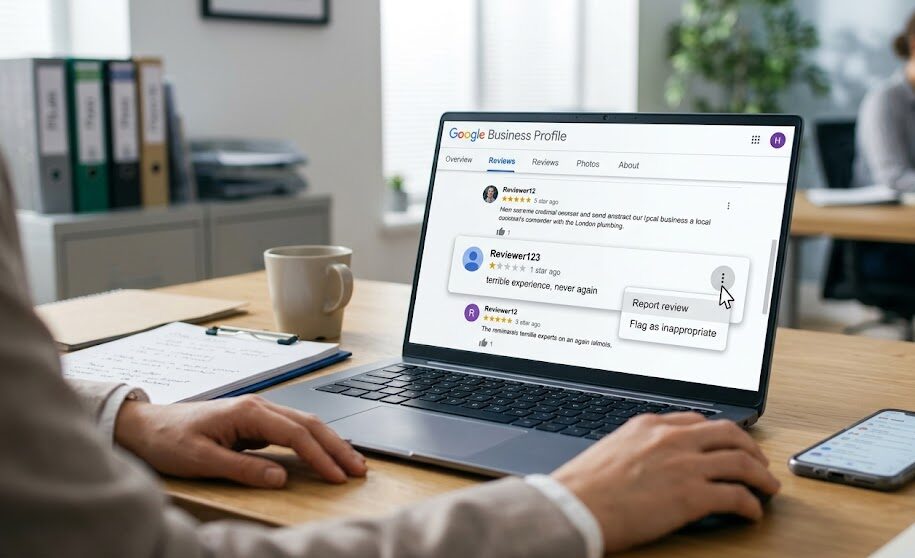
From your Google Business Profile, find the review in the Reviews tab and click the three dot menu in the corner. Choose Report review or Flag as inappropriate, depending on which version of the profile interface you see.
4. Choose the Right Policy Reason
Google will ask why the review breaks its rules. Pick the option that matches the actual issue, such as fake engagement, conflict of interest or off topic content, rather than the most dramatic sounding one on the list. A precise report is easier for a reviewer on Google’s side to act on.
Using Google’s Extortion Reporting Route
Some UK businesses are targeted with a one star review followed by a message demanding payment, a discount or free work to make it disappear. Google treats this as its own category, separate from a normal fake review report and has a dedicated process for it.
Do not pay, negotiate or get drawn into a long exchange. Save every message and the review itself, then use the extortion reporting route rather than the standard one. If money has already changed hands or the scam reaches beyond the review itself, reporting it to Action Fraud is worth doing alongside the Google report.
Keep any reply short if you respond at all. Something like: “We do not engage with threats or payment requests. This has been reported.” No essay, no arguing the details in public. The point is to close the conversation down, not win it.
Does Flagging a Review Hide It While Google Investigates?
Most business owners assume a reported review disappears the moment they hit submit. It does not.
The review stays fully visible on your profile while Google reviews the report, which can take anywhere from a few days to a couple of weeks. That gap matters for planning. If a damaging review is live and under review, it is still worth responding calmly in public and, where it makes sense, working on genuine new reviews in parallel rather than waiting in silence for a verdict that might not go your way.
How the 2025 CMA Agreement With Google Changed the Odds
In January 2025, the Competition and Markets Authority announced that Google had agreed to tougher action against fake and misleading reviews on its platform, including stronger removal commitments and action against repeat offenders. That shift is worth knowing about because it changes how a UK business should frame a report.
A report that references a clear policy breach, backed by dated evidence, now sits inside a regulatory climate where Google faces more pressure to act consistently. It is not a guarantee. It is a reason to make the report as specific and well documented as possible rather than assuming regulatory pressure alone will do the work. Businesses that treated reporting as a formality before 2025 are increasingly finding that a well built case moves faster now than a vague one ever did.
What to Do If Google Says No
Rejection does not always mean you were wrong. It often means the report was not specific enough or the evidence did not clearly match a policy breach.
Before appealing, check whether you picked the strongest policy reason available, whether the evidence you included was dated and specific and whether anything new has come up since the first report, such as a fresh message or a second fake review from a connected account. A calm, evidence led appeal reads very differently to Google than a frustrated one.
Common Mistakes That Weaken a Report
A handful of habits quietly reduce the odds of a report succeeding, even when the underlying case is strong.
Reporting too quickly, before evidence is gathered, is the most common one. A close second is picking the most dramatic policy category instead of the accurate one, which reads as exaggeration rather than precision. Arguing with the reviewer in public before the report is resolved rarely helps either, since it gives Google less reason to see the business as the calm, reasonable party in the dispute. The businesses that get the best results tend to treat this as paperwork, not a fight.
Checklist: What to Do the Moment You Spot a Fake Review
- Screenshot the review, the reviewer’s name and the date it appeared.
- Save any messages, texts or emails connected to it, especially anything mentioning payment.
- Check the review against your actual customer, booking or job records.
- Report it through the correct route, choosing the most specific policy reason available.
- Use the extortion reporting route separately if money or freebies were demanded.
- Keep any public reply short, calm and written for future customers rather than the reviewer.
How Buy Social Review Fits Into This
Buy Social Review Team: The team has worked with more than 500 local businesses on Google Business Profile issues, including flagging and monitoring reviews that appear to break policy. Its stated approach is evidence based rather than guesswork, matching each case to the policy reason most likely to succeed.
Reporting a review yourself costs nothing but time. This guide covers the process in full. For businesses juggling a messy or urgent case alongside actually running the business,
getting an unfair review looked at professionally is worth a look.
Building a stronger review profile in parallel helps the overall picture while any single case gets sorted.
FAQs About how to report a fake google review uk
Does reporting a review hide it while Google investigates?
No. The review stays visible on your profile for the entire time Google is reviewing the report, which can take from a few days to a couple of weeks. Plan around this rather than assuming the review disappears the moment you click report.
Which three dot menu option should I click to report a review?
On your Google Business Profile, open the review in the Reviews tab and look for the three dot icon in the corner of that specific review. The option is usually labelled Report review or Flag as inappropriate depending on the interface version you have.
Which policy category should I choose when reporting?
Pick the one that matches the actual problem rather than the most serious sounding option. Fake engagement fits reviews from non customers or coordinated attacks, conflict of interest fits competitors or ex staff and off topic fits reviews aimed at the wrong business entirely.
Can I report a review anonymously?
Reporting is tied to your Google Business Profile account so it is not anonymous to Google, though the reviewer is not automatically shown who reported them. Google reviews the report internally before deciding whether to act.
Does Google notify the reviewer that they have been reported?
Google does not typically tell a reviewer that a specific report was filed against their review. If the review is removed, the reviewer may notice it has gone. They are not sent a message naming the business that reported it.
Can employees or friends report a review to help get it removed?
They can report it. A flood of reports from accounts connected to the business does not carry more weight than one well evidenced report and can look suspicious. Focus on the quality of the evidence rather than the number of people flagging it.
Is there a cost to report a review yourself?
No. Reporting a review through Google’s own tools is free. Paid services exist for businesses that want the evidence gathering, policy matching and appeal writing handled for them, which is a time trade rather than a requirement.
Can I edit or delete my report after submitting it?
Once submitted, a report cannot usually be edited. If new evidence turns up afterward, the better route is to wait for a decision and use that evidence in an appeal rather than trying to amend the original report.
Does a removed review disappear from Google Maps and Search at the same time?
Removal usually applies across Google Maps and Search together since both draw from the same Business Profile data, though it can take a short while for caches to update everywhere the listing appears.
Will my star rating go back up automatically once a fake review is removed?
Yes. Your star rating recalculates automatically once a review is removed, since it is simply an average of whatever reviews remain live on your profile. There is nothing separate to request once the removal goes through.
Final Thoughts
Knowing how to report a fake google review uk businesses actually rely on comes down to precision, not speed. Save the evidence first, pick the right policy reason and remember the review stays live while Google decides. If a report gets rejected, treat that as a reason to sharpen the evidence rather than give up. Buy Social Review can take on the messier cases directly if you would rather hand it over than run the process yourself.
Follow Us for More Google Review Tips
If you want more Google Review strategies Local SEO tips and online reputation insights follow our official social media profiles.